Showing posts with label gemini. Show all posts

Sunday, May 10, 2026

Cloud Mythos - If You Dare Open the Pandora's Box


Whether you view it as genuine caution or very clever marketing (the model gets enormous attention precisely because you can’t have it), the outcome is the same: a handful of major tech and cybersecurity companies now have exclusive access to something that can locate software vulnerabilities faster than any human or team. --Davey McGlade

Guess the Zuckerberg will be shelling out more billions for defectors from Anthropic. Coz, guess what? Facebook (META) has been DENIED!

One way of saying, you can't have it, but you can buy us for $2T

The 27 year old OpenBSD bug we all happily missed - including Eric Schmidt (an integer overflow condition that allows a remote attacker to crash any OpenBSD host responding over TCP - allowing denial of service.)


Wednesday, December 10, 2025

Be Your Own AI/ML Hero. Start Here and Work Your Way Up


Open a new window with a table of atomic AI/ML concepts starting from scratch, with hooks to easily go to chatGPT with questions.


Sunday, December 07, 2025

Check Your AI/ML Mastery. Will Zuck Pay *You* a $100m?

AI/ML Cutting-Edge Concepts – Flashcards
Click “Show Answer”, then Copy or move to Next. Cards are shuffled on each visit.
Concept 1 of N
Card 1 of N


Wednesday, April 09, 2025

Gorilla Publishing - Springer and Elsevier


Every industry has certain problems universally acknowledged as broken: insurance in health care, licensing in music, standardized testing in education, tipping in the restaurant business. In academia, it’s publishing. Academic publishing is dominated by for-profit giants like Elsevier and Springer. Calling their practice a form of thuggery isn’t so much an insult as an economic observation. Imagine if a book publisher demanded that authors write books for free and, instead of employing in-house editors, relied on other authors to edit those books, also for free. And not only that: The final product was then sold at prohibitively expensive prices to ordinary readers, and institutions were forced to pay exorbitant fees for access.

Sheon Han, W.I.R.E.D

Google

Springer and Elsevier's dominance in academic publishing is rooted in several factors, including aggressive acquisition of smaller publishers, a focus on high-impact journals, and the lucrative nature of the academic publishing market. These companies also leverage the prestige of their publications to attract top researchers and, in turn, increase their profits. 

Key Factors in their Dominance:

Acquisitions:

Both companies have actively acquired smaller, specialized publishers, expanding their journal portfolios and market reach. 

High-Impact Journals:

They prioritize publishing in "prestigious" journals that are highly cited, as these journals are often crucial for career advancement and funding. 

Business Model:

Their business model involves charging high subscription fees to universities and libraries, while also generating revenue from Article Processing Charges (APCs) for open access articles. 

Market Influence:

The prestige of their journals, coupled with the dominance of a few large publishers, creates a competitive landscape where researchers are incentivized to publish in their publications. 

Open Access:

While increasingly embracing open access, they also maintain a hybrid model that allows for continued subscription revenue, sometimes leading to criticism about "double-dipping". 

Examples:

Springer:

Acquired Kluwer Academic Publishers in 2004, significantly expanding their journal portfolio. 

Elsevier:

Expanded its reach through acquisitions like North-Holland and Excerpta Medica, introducing technology to their publishing process. 

In essence, Springer and Elsevier have become dominant players in academic publishing by strategically acquiring competitors, focusing on high-impact journals, and leveraging a business model that benefits from both subscription fees and APCs, all while influencing the academic world's perceptions of research impact and career success. 

chatG

Springer and Elsevier rose to dominate academic publishing through a mix of historical timing, strategic mergers and acquisitions, and by capitalizing on how academic incentives work. Here's a breakdown of the key factors that led to their dominance:


1. Early Entry and Legacy

  • Elsevier (founded in 1880 in the Netherlands) and Springer (founded in 1842 in Germany) were among the earliest players in scientific publishing.

  • They gained a foothold in Europe and expanded globally as science became more international in the 20th century.


2. Massive Journal Portfolios

  • They built large catalogs of journals, especially during the post-WWII boom in science and technology.

  • Owning key journals gave them gatekeeping power over critical fields.


3. Mergers and Acquisitions

  • Elsevier acquired many publishers over the years, including Pergamon Press (1991) and part of Harcourt (2001).

  • Springer merged with Kluwer Academic Publishers (2004) and later became Springer Nature after a merger with Nature Publishing Group (2015).

  • These moves helped consolidate control over thousands of journals.


4. Subscription-Based Revenue Model

  • They pioneered the “Big Deal”: libraries would subscribe to bundles of journals instead of selecting individual titles.

  • This locked in recurring revenue and made it hard for libraries to cancel.

  • Universities were pressured to pay due to faculty and researcher demand.


5. Academia’s Incentives

  • Researchers are rewarded for publishing in prestigious journals — many of which these companies own.

  • These publishers don’t pay authors or peer reviewers, so they get content and quality control for free.

  • This system feeds their power: the more elite journals they own, the more researchers feel they must publish there.


6. Digital Shift and Paywalls

  • As journals went online, they created walled gardens of scientific knowledge.

  • Paywalls became a major source of profit. Elsevier, for example, has had profit margins over 30%, higher than Apple or Google in some years.


7. Slow Institutional Pushback

  • Only recently have movements like Open Access, Plan S, Sci-Hub, and institutional boycotts (e.g., from UC system) started to challenge them.

  • But these changes are slow, because academic publishing norms and tenure systems are deeply entrenched.


Wednesday, January 08, 2025

How You Can Squeeze Notebook LM


It claims to be happy with a URL. Try it and you find it doesn't do much - in fact, nothing at all..

So, what *can* you do?

Download the website - say it's one of those ancient online books with a TOC and Previous/Next buttons on each page. Use httrack.

Then, use this script (click to select) to (since Notebook LM takes markdown) pull the text from each page *meaningfully*. That is, you're saying Notebook LM is smart enough to make something out of headings. Else, you could just give it text. Ja? :)

Yes, you might need to ask chatGPT for a bash script to put all the text files into one - since N LM says something about a 50 file limit.

import sys import os import html2text def convert_html_to_text(input_path, output_path): # Read the HTML content from the input file try: with open(input_path, "r", encoding="utf-8") as infile: html_content = infile.read() except FileNotFoundError: print(f"Error: The file '{input_path}' was not found.") sys.exit(1) except Exception as e: print(f"Error reading the file '{input_path}': {e}") sys.exit(1) # Convert HTML to text text_maker = html2text.HTML2Text() text_maker.ignore_links = True # Optional: Ignore links in the output text = text_maker.handle(html_content) # Write the plain text to the output file try: with open(output_path, "w", encoding="utf-8") as outfile: outfile.write(text) print(f"Text successfully written to '{output_path}'.") except Exception as e: print(f"Error writing to the file '{output_path}': {e}") sys.exit(1) if __name__ == "__main__": # Ensure correct usage if len(sys.argv) != 3: print("Usage: python html2text_converter.py <input_file> <output_file_or_directory>") sys.exit(1) # Get command-line arguments input_file = sys.argv[1] output_arg = sys.argv[2] # Check if input file exists if not os.path.isfile(input_file): print(f"Error: The input file '{input_file}' does not exist.") sys.exit(1) # Determine output path if os.path.isdir(output_arg): # If output_arg is a directory, create the output file path output_file = os.path.join( output_arg, os.path.splitext(os.path.basename(input_file))[0] + ".md" ) else: # If output_arg is a file, use it directly output_file = output_arg # Perform conversion convert_html_to_text(input_file, output_file)

And then:

$ for fil in download_folder_name/www.websitename.com/somefolder/text/*.html ; do python3 script.py $fil destination_dir; done

Then, just upload the files from this destination directory and you're ready to start chatting with your data. It does work!

Tuesday, November 12, 2024

On the Fly Tool Creation with chatGPT

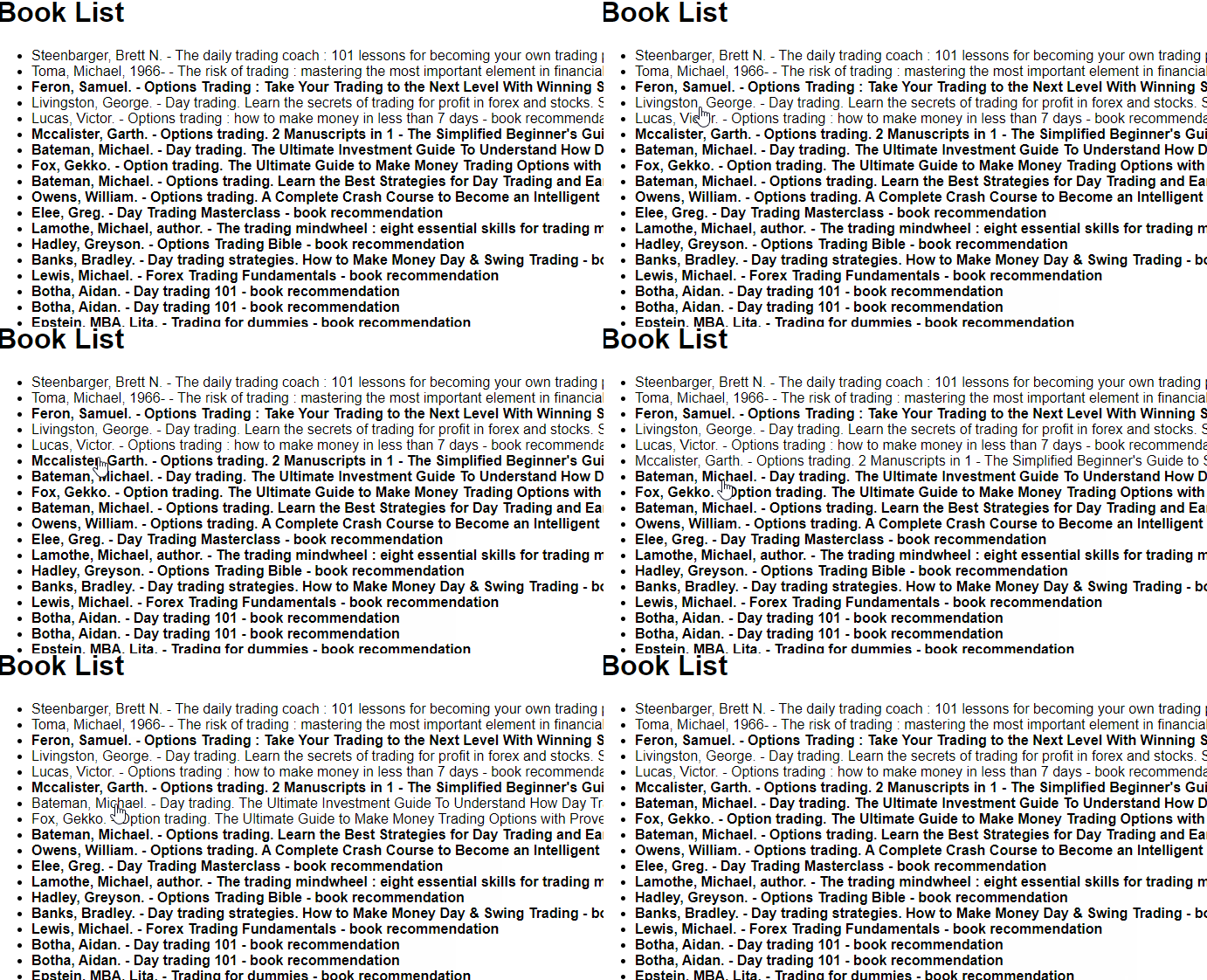
If you know me, you know I'm a tool guy. In this case, I have a list of books that I want to put in my email. I'd like to do what the video shows - have the author,title in a line of text, click on it and be able to insert that in my email in a message to myself. So, how do I get such a list that is "interactive" - because I want to see which ones I've already picked - aka, where I am in the list..


Thank you chatGPT. Sometimes, you can hack it.

Starting prompt (one iteration saying "not ok" not shown)

I will give you a text file consisting of several paragraphs. Each will contain the name of a book and author. The book name is on the first line and "by <author name>" on second line.

Your task is to parse the text, and give me a downloadable HTML file with javascript. When I open the file in a browser, I will see the list of books and authors in this format : 

author name - book name - book recommendation

To clarify, that means name of the book, then a a hyphen, the author name, another hyphen and finally, the words "book recommendation" . One one each line

The javascript will ensure that, when I click on any line, the text of the entire line will be copied to clipboard. No alert box of any kind is required and should be suppressed.

All the text should initially be displayed in bold font. When a line is clicked (anytime a line is clicked, its text will be copied to clipboard) it's font should toggle - that is, if it was bold, it should change to normal and vice versa.

And chatGPT's re-write:

I will provide a text file with several paragraphs. Each paragraph includes the title of a book on the first line and the author on the second line, formatted as:

<Book Title>

by <Author Name>.

Your task is to:

Parse the file to extract the book titles and author names.

Create a downloadable HTML file that:

Displays the books and authors in the following format:

  • <Author Name> - <Book Title> - book recommendation.
  • Lists each book entry on its own line.

Add functionality to the HTML using JavaScript so that:

All book entries are initially displayed in bold font.
Clicking on any line:
  • Copies the text of the entire line to the clipboard silently (no alerts or pop-ups should be shown).
  • Toggles the appearance of the line between bold and normal fonts.

Ensure the font toggling works regardless of the initial style applied or browser-specific behavior.

Style the HTML for readability:

  • Use a clear, modern font (e.g., Arial or sans-serif).
  • Ensure the list items change the cursor to a pointer on hover, indicating they are clickable.

Believe it or not, the JS magic doing that formatting is pretty compact:

<script>

  document.querySelectorAll('.book-item').forEach(item => {

    item.addEventListener('click', () => {

      // Copy text to clipboard

      navigator.clipboard.writeText(item.innerText).catch(err => console.error(err));

      // Toggle font weight

      item.style.fontWeight = item.style.fontWeight === 'bold' || item.style.fontWeight === '' ? 'normal' : 'bold';

    });

  });

</script>